> ## Documentation Index
> Fetch the complete documentation index at: https://docs.goldsky.com/llms.txt
> Use this file to discover all available pages before exploring further.
# GraphQL Endpoints
All subgraphs come with a GraphQL interface that allows you to query the data in the subgraph. Traditionally these GraphQL
interfaces are completely public and can be accessed by anyone. Goldsky supports public GraphQL endpoints for both
subgraphs and their tags.
## Public endpoints
For example, in the Goldsky managed community project there exists the `uniswap-v3-base/1.0.0` subgraph with a tag of `prod`.
This subgraph has a [public endpoint](https://api.goldsky.com/api/public/project_cl8ylkiw00krx0hvza0qw17vn/subgraphs/uniswap-v3-base/1.0.0/gn)
and the tag `prod` also has a [public endpoint](https://api.goldsky.com/api/public/project_cl8ylkiw00krx0hvza0qw17vn/subgraphs/uniswap-v3-base/prod/gn).
 In general, public endpoints come in the form of `https://api.goldsky.com/api/public//subgraphs///gn`
Goldsky adds rate limiting to all public endpoints to prevent abuse. We currently have a default rate limit of 50 requests per 10 seconds.
This can be unlocked by contacting us at [support@goldsky.com](mailto:support@goldsky.com).
One major downside of public endpoints is that they are completely public and can be accessed by anyone. This means that
anyone can query the data in the subgraph and potentially abuse the endpoint. This is why we also support private endpoints.
## Private endpoints
Private endpoints are only accessible by authenticated users. This means that you can control who can access the data in
your subgraph. Private endpoints are only available to users who have been granted access to the subgraph. Accessing
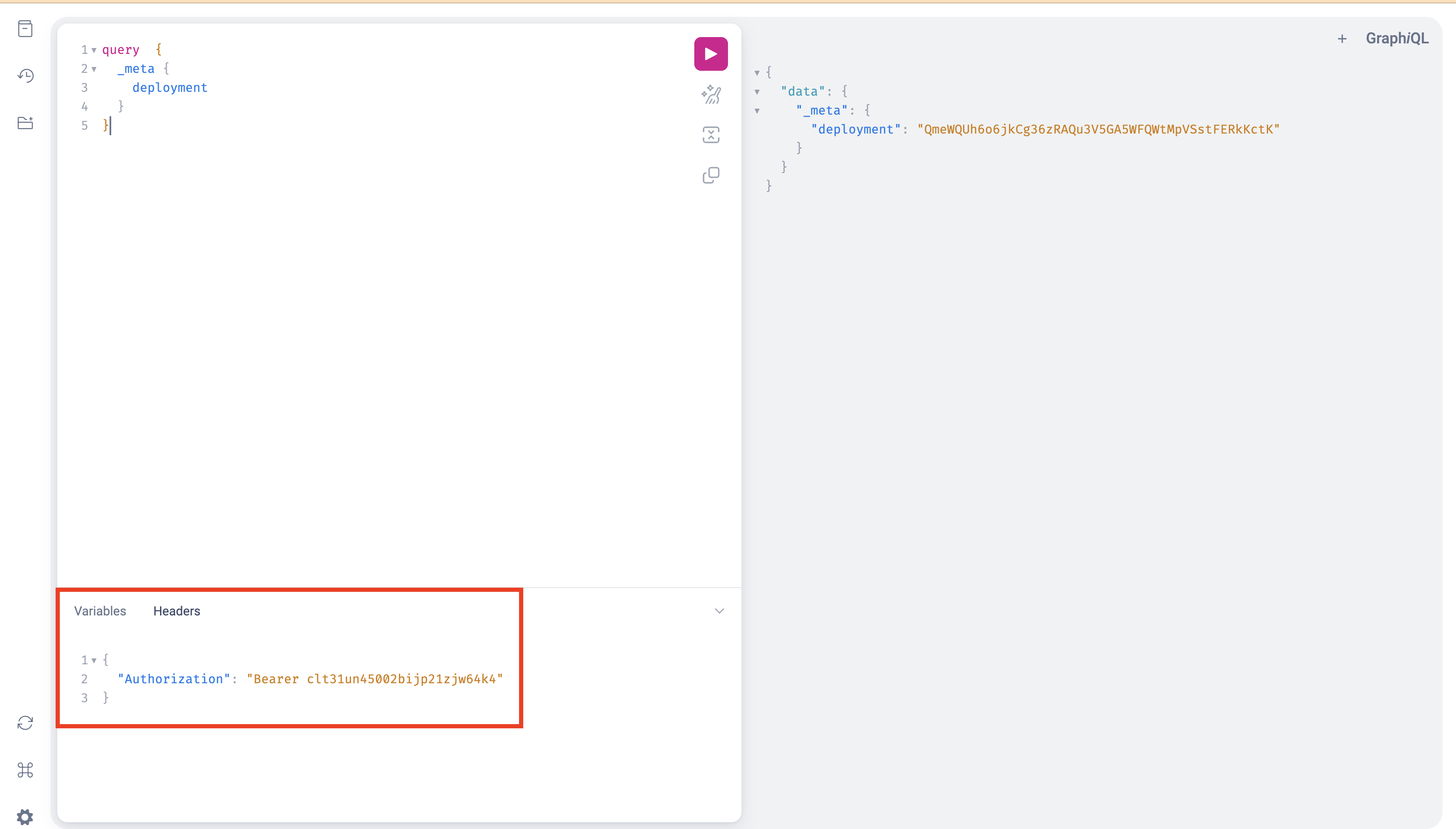
a private endpoint requires sending an `Authorization` header with the GraphQL request. The value of the `Authorization`
header should be in the form of `Bearer ` where the `token` is an API token that has been generated through
[Goldsky project general settings](https://app.goldsky.com/dashboard/settings#general). Remember that API tokens are scoped to specific projects. This means an API
token for `projectA` cannot be used to access the private endpoints of subgraphs in `projectB`.
Private endpoints can be toggled on and off for each subgraph and tag. This means that you can have a mix of public and
private endpoints for your subgraph. For example, you can have a public endpoint for your subgraph and a private endpoint
for a specific tag.
Here's an example of how to access a private endpoint using the GraphiQL interface:
In general, public endpoints come in the form of `https://api.goldsky.com/api/public//subgraphs///gn`
Goldsky adds rate limiting to all public endpoints to prevent abuse. We currently have a default rate limit of 50 requests per 10 seconds.
This can be unlocked by contacting us at [support@goldsky.com](mailto:support@goldsky.com).
One major downside of public endpoints is that they are completely public and can be accessed by anyone. This means that
anyone can query the data in the subgraph and potentially abuse the endpoint. This is why we also support private endpoints.
## Private endpoints
Private endpoints are only accessible by authenticated users. This means that you can control who can access the data in
your subgraph. Private endpoints are only available to users who have been granted access to the subgraph. Accessing
a private endpoint requires sending an `Authorization` header with the GraphQL request. The value of the `Authorization`
header should be in the form of `Bearer ` where the `token` is an API token that has been generated through
[Goldsky project general settings](https://app.goldsky.com/dashboard/settings#general). Remember that API tokens are scoped to specific projects. This means an API
token for `projectA` cannot be used to access the private endpoints of subgraphs in `projectB`.
Private endpoints can be toggled on and off for each subgraph and tag. This means that you can have a mix of public and
private endpoints for your subgraph. For example, you can have a public endpoint for your subgraph and a private endpoint
for a specific tag.
Here's an example of how to access a private endpoint using the GraphiQL interface:
 Private subgraphs endpoints follow the same format as public subgraph endpoints except they start with `/api/private`
instead of `/api/public`. For example, the private endpoint for the `prod` tag of the `uniswap-v3-base/1.0.0` subgraph
would be `https://api.goldsky.com/api/private/project_cl8ylkiw00krx0hvza0qw17vn/subgraphs/uniswap-v3-base/1.0.0/gn`.
### Revoking access
To revoke access to a private endpoint you can simply delete the API token that was used to access the endpoint. If you
don't know which key is used to access the endpoint, you'll have to revoke all API tokens for all users that have access
to the project.
## Enabling and disabling public and private endpoints
By default, all new subgraphs and their tags come with the public endpoint enabled and the private endpoint disabled.
Both of these settings can be changed using the CLI and the webapp. To change either setting, you must have [`Editor` permissions](../rbac).
### CLI
To toggle one of these settings using the CLI you can use the `goldsky subgraph update` command with the
`--public-endpoint ` flag and/or the `--private-endpoint ` flag. Here's a complete example
disabling the public endpoint and enabling the private endpoint for the `prod` tag of the `uniswap-v3-base/1.0.0` subgraph:
```bash theme={null}
goldsky subgraph update uniswap-v3-base/prod --public-endpoint disabled --private-endpoint enabled
```
### Dashboard
To toggle one of these settings using the dashboard webapp you can navigate to the subgraph detail page and use the relevant
toggles to enable or disable the public or private endpoints of the subgraph or its tags.
[//]: # "TODO: add a screenshot of this once the implementation and design are complete"
### Errors
Goldsky does not enforce CORS on our GraphQL endpoints. If you see an error that references CORS, or an error with the response code 429, you're likely seeing an issue with rate limiting. Rate limits can be unlocked on a case-by-case basis on the Scale plan and above. Please [reach out to us](mailto:support@goldsky.com?subject=Rate%20limits%20or%20errors) if you need help with rate limits or any GraphQL response errors.
Private subgraphs endpoints follow the same format as public subgraph endpoints except they start with `/api/private`
instead of `/api/public`. For example, the private endpoint for the `prod` tag of the `uniswap-v3-base/1.0.0` subgraph
would be `https://api.goldsky.com/api/private/project_cl8ylkiw00krx0hvza0qw17vn/subgraphs/uniswap-v3-base/1.0.0/gn`.
### Revoking access
To revoke access to a private endpoint you can simply delete the API token that was used to access the endpoint. If you
don't know which key is used to access the endpoint, you'll have to revoke all API tokens for all users that have access
to the project.
## Enabling and disabling public and private endpoints
By default, all new subgraphs and their tags come with the public endpoint enabled and the private endpoint disabled.
Both of these settings can be changed using the CLI and the webapp. To change either setting, you must have [`Editor` permissions](../rbac).
### CLI
To toggle one of these settings using the CLI you can use the `goldsky subgraph update` command with the
`--public-endpoint ` flag and/or the `--private-endpoint ` flag. Here's a complete example
disabling the public endpoint and enabling the private endpoint for the `prod` tag of the `uniswap-v3-base/1.0.0` subgraph:
```bash theme={null}
goldsky subgraph update uniswap-v3-base/prod --public-endpoint disabled --private-endpoint enabled
```
### Dashboard
To toggle one of these settings using the dashboard webapp you can navigate to the subgraph detail page and use the relevant
toggles to enable or disable the public or private endpoints of the subgraph or its tags.
[//]: # "TODO: add a screenshot of this once the implementation and design are complete"
### Errors
Goldsky does not enforce CORS on our GraphQL endpoints. If you see an error that references CORS, or an error with the response code 429, you're likely seeing an issue with rate limiting. Rate limits can be unlocked on a case-by-case basis on the Scale plan and above. Please [reach out to us](mailto:support@goldsky.com?subject=Rate%20limits%20or%20errors) if you need help with rate limits or any GraphQL response errors.