

 Turbo
Turbo Edge RPC
 Boost
Boost Feeds
Feeds Compose
 Subgraphs
Overview
Write data to a PostgreSQL database with automatic table creation and upsert support. You have two paths:- Goldsky-hosted Postgres (recommended for most users). Goldsky provisions and manages the database for you via NeonDB. No database administration, no networking setup. Available on Scale plans and above.
- Bring your own Postgres. Connect Turbo to a Postgres database you already run (Neon, Supabase, RDS, Cloud SQL, self-hosted, and similar).
sinks configuration for both.
Hosted Postgres works the same way for Turbo and legacy Mirror pipelines. This page is the source of truth for both.
- Goldsky-hosted Postgres (recommended)
- Bring your own Postgres
Goldsky provisions a dedicated, autoscaling Postgres database for you. Creating the database automatically adds it to your Sinks and registers a Goldsky secret you can reference from any pipeline. There’s no separate
goldsky secret create step.Hosted Postgres is a Scale plan feature (and above). The Free plan does not include it. See the pricing page for details. Adding a credit card to your account upgrades you to Scale.
1
Create a hosted Postgres database
You can provision a hosted Postgres database from the Goldsky web app or from the CLI.From the web app, two entry points:The command prints the new secret’s name, ID, and type. For security, the connection string is not printed by the CLI; look it up in the web app’s Sinks section if you need the raw credentials. Pass
- Sinks > New sink > Hosted Postgres. Provision a standalone database you can reuse across pipelines.
- From the pipeline create flow. When you’re configuring a Postgres sink for a new pipeline, choose “Create a new hosted Postgres database” inline and the dashboard will provision one and wire it into the pipeline.
--name to choose the secret name (otherwise one is generated as HOSTED_POSTGRES_<RANDOM>). See the CLI reference for all options.2
Reference the hosted secret in your pipeline
Use the secret name the dashboard assigned (visible in Secrets and on the hosted Postgres detail page) in the
secret_name field of your Postgres sink. See Configuration below. No firewall rules, no use_dedicated_ip, no role creation needed.Configuration
The same sink configuration works for both Goldsky-hosted and bring-your-own Postgres. Only the secret behindsecret_name differs.
Parameters
string
required
Must be
postgres.string
required
Name of the transform or source to read data from.
string
required
PostgreSQL schema name (for example,
public, analytics). Created automatically if it doesn’t exist.string
required
Table name to write to. Created automatically if it doesn’t exist, with columns inferred from the upstream Arrow schema.
string
required
Name of a Goldsky secret holding the Postgres connection details (host, port, user, password, databaseName). For hosted Postgres, use the secret name shown on the hosted database detail page.
string
Comma-separated list of columns to use as the table’s primary key. When set, writes become upserts (
INSERT ... ON CONFLICT DO UPDATE). When omitted, writes are plain inserts and no primary key is added to the auto-created table.string
default:"update"
Behavior when a row with the same
primary_key already exists. update runs ON CONFLICT ... DO UPDATE SET, nothing runs ON CONFLICT ... DO NOTHING. Only applies when primary_key is set.object
Map of
column: operator conditions that gate the DO UPDATE on an upsert. Each entry becomes EXCLUDED."<column>" <operator> "<table>"."<column>" and all entries are joined with AND into a single WHERE clause on the ON CONFLICT ... DO UPDATE SET. See Conditional updates with update_where below. Only applies when primary_key is set and on_conflict is update (its default); ignored when on_conflict is nothing.integer
Maximum number of rows to accumulate before flushing to Postgres. Falls back to the engine default when unset.
string
Maximum time to wait before flushing a partial batch, parsed as a humantime duration (for example,
"500ms", "1s", "2s"). Falls back to the engine default when unset.integer
default:"1"
Number of parallel writer tasks. Each task processes a slice of the accumulated batch concurrently. Increase for sink-bound pipelines.
Behavior
- Auto schema and table creation: both the schema and the table are created with
CREATE ... IF NOT EXISTSon first write. Columns are derived from the upstream Arrow schema. - No automatic schema migrations: if the table already exists, the engine does not
ALTER TABLEto add or change columns. Upstream schema changes that add new columns will fail at insert time. Drop or manually migrate the table first. - Upsert vs. insert: setting
primary_keyproducesINSERT ... ON CONFLICT (<pk>) DO UPDATE SET .... Withoutprimary_key, rows are plainINSERTs and no primary key constraint is created. - Type mapping: Arrow types are mapped automatically.
Int32toINTEGER,Int64toBIGINT,Utf8toTEXT,BooleantoBOOLEAN,Decimal(p, s)toNUMERIC(p, s), structs/lists/maps toJSONB. - 256-bit integers (
U256/I256): see 256-bit integers below. UInt64: stored asNUMERIC(becauseBIGINTis signed and cannot hold the full unsigned range).
Conditional updates with update_where
By default, an upsert (primary_key set, on_conflict: update) overwrites the existing row with every incoming row that shares the same primary key. update_where narrows that: the sink only overwrites the existing row when a per-column condition against the incoming row is true.
Each entry in the map is column: operator. The sink compiles all entries into a single WHERE clause on the DO UPDATE SET, comparing the incoming value (EXCLUDED."<column>") to the value already in the table ("<table>"."<column>"):
AND. All of them must be true for the update to happen. If the WHERE clause is false, Postgres keeps the existing row and the incoming row is discarded.
Allowed operators: =, >, >=, <, <=, !=, <>.
update_where is validated at pipeline start: every column named in the map must exist in the upstream schema, and every operator must be in the list above. The pipeline fails to deploy otherwise.
When to use it
- Ignore late-arriving updates: gate on a monotonically increasing column like
updated_ator a block number so an older event never overwrites a newer one. - Only update on real change: gate on the value column itself (for example,
status: "!=") so a rewrite of the same row is a no-op.
Example
Only overwrite a row when the incomingupdated_at is strictly newer than what’s already stored:
update_where only applies to the upsert path (primary_key set and on_conflict: update, which is the default). It is ignored when on_conflict is nothing, and has no effect on plain inserts (no primary_key).256-bit integers (U256 / I256)
EVM-native datasets contain values that exceed any standard SQL integer type. For example, uint256 on value, balance, totalSupply, raw wei amounts, and ERC-20 amount columns. Turbo carries these through the pipeline as Arrow FixedSizeBinary(32) columns tagged with internal U256 or I256 metadata.
When the Postgres sink writes one of these columns, it does the following automatically:
- Auto-created tables: the column is created as
NUMERIC(78, 0).78digits is the smallest decimal precision that can represent everyU256value (2^256 − 1has 78 decimal digits) and everyI256value.0scale means whole numbers only, no fractional part is ever produced. - In-flight encoding: at write time, the sink converts each 32-byte big-endian value to its full decimal string representation (no scientific notation, no truncation) and sends that string in the
INSERT. Postgres parses the string directly into theNUMERICcolumn. The conversion does not round, does not lose precision, and is independent of any client locale. - Existing tables with a different type: if the destination table already exists and the matching column is not
NUMERIC(78, 0)(or a widerNUMERICthat can hold the same range), the sink fails the write instead of silently coercing or truncating. To migrate, drop the table and let the sink recreate it, or manuallyALTERthe column toNUMERIC(78, 0).
Querying NUMERIC(78, 0) values
NUMERIC(78, 0) values are returned by Postgres drivers in different ways depending on the language. A few common cases:
psql/ generic SQL: use the value as-is. Casts likeCAST(value AS NUMERIC) / 1e18work, but mixingNUMERICwith floating-point loses precision. Keep arithmetic inNUMERICif you care about exactness.- Node.js (
pglibrary):NUMERICis returned as a JavaScript string by default to avoid silent precision loss. Convert withBigInt(row.value)rather thanNumber(row.value). - Python (
psycopg2/psycopg3): returned asdecimal.Decimal, which is full-precision. - Go (
pgx): usepgtype.Numericor scan into a*big.Int/*big.Float. Scanning intoint64will overflow.
Pre-converting in a transform
If your downstream consumers cannot work with arbitrary-precision decimals, convert before the sink:- SQL transform: cast to a smaller type only when you know the value fits. For example, ERC-20 amounts scaled by
decimalsoften fit inDECIMAL(38, 18). Out-of-range values will raise an error. - TypeScript transform: use
BigIntfor math and return the result as a string. The TypeScript sandbox supportsBigIntnatively. See the TypeScript transform docs.
Tips for backfilling large datasets into PostgreSQL
While PostgreSQL offers fast access of data, writing large backfills into PostgreSQL can sometimes be hard to scale. Pipelines are often bottlenecked against sinks. Things to try:Avoid indexes on tables until after the backfill
Indexes increase the amount of writes needed for each insert. When doing many writes, inserts can slow down significantly if you’re hitting resource limits.Bigger batch sizes for the inserts
Thebatch_size setting controls how many rows are batched into a single insert statement. Depending on the size of the events, you can increase this to help with write performance. 1000 is a good number to start with. The pipeline will collect data until the batch is full, or until batch_flush_interval is met.
Temporarily scale up the database
Look at your database stats like CPU and memory to see where the bottlenecks are. Big writes are often not blocked on CPU or RAM, but on network or disk I/O. For Google Cloud SQL, there are I/O burst limits that you can surpass by increasing the amount of CPU. For AWS RDS instances (including Aurora), the network burst limits are documented for each instance. A rule of thumb is to look at theEBS baseline I/O performance, since burst credits are easily used up in a backfill scenario.
Provider-specific notes
AWS Aurora Postgres
When using Aurora for large datasets, useAurora I/O optimized. It charges for more storage but gives you immense savings on I/O credits. If you’re streaming the entire chain into your database or have a very active subgraph, these savings can be considerable, and the disk performance is significantly more stable, resulting in a more stable CPU usage pattern.
Supabase
Supabase’s direct connection URLs only support IPv6 connections and will not work with our default validation. There are two solutions:-
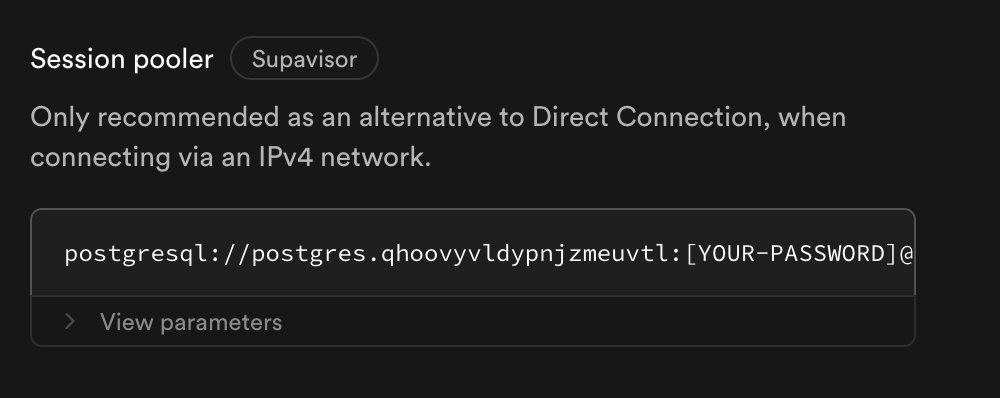
Use Session Pooling. In the Supabase connection screen, scroll down to see the connection string for the session pooler. This is included in all Supabase plans and works for most people. Sessions will expire and may produce some warning logs in your pipeline logs. These are handled gracefully and no action is needed. No data will be lost due to a session disconnection.
- Alternatively, buy the IPv4 add-on if session pooling doesn’t fit your needs. It can lead to more persistent direct connections.
Neon
Use the connection string from your Neon project dashboard. SSL is required (?sslmode=require is included by default in the connection string Neon gives you).
Self-hosted PostgreSQL
Setlisten_addresses = '*' in postgresql.conf, add a pg_hba.conf rule for your Goldsky writer role, and ensure your host firewall allows inbound TCP on the Postgres port.