

 Turbo
Turbo Edge RPC
 Boost
Boost Feeds
Feeds Compose
 Subgraphs
What you’ll need
- A Goldsky account and the CLI installed
Install Goldsky's CLI and log in
Install Goldsky's CLI and log in
-
Install the Goldsky CLI:
For macOS/Linux:
For Windows:Windows users need to have Node.js and npm installed first. Download from nodejs.org if not already installed.
-
Log into your Project by running:
This opens your browser to sign in (Google, GitHub, SSO, or email). Once you authenticate, the CLI is logged in automatically — there’s no API key to copy or paste.On a headless or remote machine (or in CI), create an API key on your Project Settings page and pass it directly with
goldsky login --token <API_KEY>. Usegoldsky login --no-browserto print the login URL instead of opening a browser. -
Now that you are logged in, run
goldskyto get started:
- A basic understanding of Turbo pipelines
- A destination sink to write your data to. In this example, we will use the PostgreSQL sink
Introduction
Most decentralized exchanges these days are based entirely on the Uniswap protocol or have strong similarities with it.If you need a high level overview of how Uniswap works you can check out this reference page
Swap and PoolCreated events as they are arguably two of the most important events to track when wanting to make sense of trading activity in a DEX.
For this example implementation, we will choose the base.raw_logs dataset (EVM sources) as the source of our pipeline, but you could choose any other chain for which a raw logs dataset is available.
Raw logs need to be decoded for us to be able to identify the events we want to track. For that purpose, we will use the decoding functions to dynamically fetch the ABIs of both the UniswapV3Factory and UniswapV3Pool contracts, since they contain the actual definitions of the PoolCreated and Swap events.
It’s worth mentioning that Uniswap has different versions and it’s possible that some event definitions might differ. In this example we’ll focus on UniswapV3. Depending on the events you are interested in tracking you might want to refine this example accordingly, but the principles explained will stay the same.
Pipeline definition
base-dex-trades.yaml
If you copy and use this configuration file, make sure to update:
- Your
secret_name. If you already created a secret, you can find it via the CLI commandgoldsky secret list. - The schema and table you want the data written to. By default it writes to the
decoded_eventsschema.
Filtering by event signature
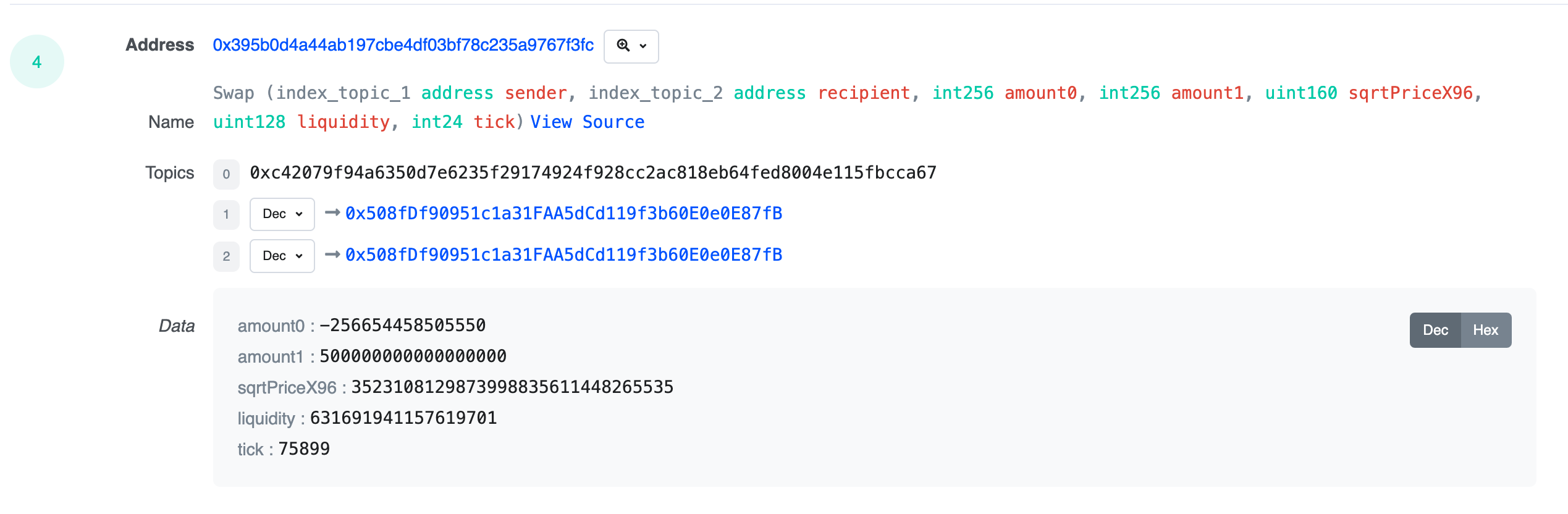
The first topic of every EVM log (topic0) is the keccak256 hash of the event’s signature, so we can filter raw logs down to just the events we care about before decoding anything. The two events map to these hashes:PoolCreated (index_topic_1 address token0, index_topic_2 address token1, index_topic_3 uint24 fee, int24 tickSpacing, address pool)maps to0x783cca1c0412dd0d695e784568c96da2e9c22ff989357a2e8b1d9b2b4e6b7118Swap (index_topic_1 address sender, index_topic_2 address recipient, int256 amount0, int256 amount1, uint160 sqrtPriceX96, uint128 liquidity, int24 tick)maps to0xc42079f94a6350d7e6235f29174924f928cc2ac818eb64fed8004e115fbcca67
topics column is a comma-separated string, we use SPLIT_INDEX to extract topic0 and compare it against each hash. You can also write the same filter as topics LIKE '0x783cca1c%', or derive the hash in the query itself with _gs_keccak256.
Next, there are 4 transforms in this pipeline definition which we’ll explain, starting from the top:
Decoding transforms
Transform: factory_decoded
Transform: pool_decoded
PoolCreated and Swap events in the following transforms.
As explained in the Decode contract events guide, we first make use of the _gs_fetch_abi function to get each ABI and pass it as the first argument to the _gs_log_decode function, which decodes the log’s topics and data. We store the result in a decoded struct which we unnest in the next transforms.
Event filtering transforms
Transform: factory_clean
Transform: pool_clean
PoolCreated and Swap events:
id: This is the Goldsky providedid, a string composed of the dataset name, block hash, and log index, which is unique per event. Here’s an example:log_0x60eaf5a2ab37c73cf1f3bbd32fc17f2709953192b530d75aadc521111f476d6c_18decoded.event_params as event_params:event_paramsis an array containing the parameters associated with each event. For instance, in the case ofSwapevents,event_params[1]is the sender. You could use this for further analysis in downstream processing.decoded.event_signature as event_signature: the decoder outputs the event name asevent_signature, excluding its arguments.WHERE decoded IS NOT NULL: to leave out potential null results from the decoder.AND decoded.event_signature = 'PoolCreated': we use this value to keep onlyPoolCreated(orSwap) events. This makes each downstream table single-purpose even though both decode transforms read from the same source.
Mint you could easily add them to these queries; for example: WHERE decoded.event_signature IN ('Swap', 'Mint')
Both resulting datasets will be used as sources to two different tables at our sink: decoded_events.poolcreated and decoded_events.swaps.
Deploying the pipeline
Assuming we are using the same filename for the pipeline configuration as in this example, we can deploy this pipeline with:
We can see that it corresponds to the Swap event of this transaction:
Conclusion
In this guide, we’ve walked through the process of using Turbo pipelines to decode and stream DEX events, specifically focusing onSwap and PoolCreated events, into a PostgreSQL database.
Along the way we have seen an example implementation of how to do inline decoding using the ABIs of factory and pool contracts with the decoding functions.
Can’t find what you’re looking for? Reach out to us at support@goldsky.com for help.